Verifying Verifiable Credentials
This how-to uses the VS Agent primitives directly. The normal path for verification is the Agent Pack's flows.authentication block, which wires credential presentation into the chat UI automatically. Come back here when you need direct access to the /v1/invitation/presentation-request endpoint.
We know how to issue credentials — but how do we ask users for any credential, whether issued by us or by another entity we trust?
In this tutorial we'll show a simple example building our Verifier VS from scratch using the raw VS Agent presentation-request API.
Requisites
To complete this tutorial, you will need any Linux/MacOS-based computer with:
- Docker
- Node.js 20 or newer
VS Agent set-up
As an active participant of the Verifiable Trust ecosystem, the set-up of a Verifier agent compared to an issuer is the same: we need to make sure to define an AGENT_PUBLIC_DID, since Hologram App will require to see the Proof of Trust before allowing users to presnet credentials to us.
So let's run our verifier VS Agent:
docker run -p 3001:3001 -p 3000:3000 \
  -e AGENT_PUBLIC_DID=did:webvh:myhost.ngrok-free.app \
  -e EVENTS_BASE_URL=http://your-local-ip:4001 \
  -e AGENT_LABEL="My First Hologram VS" \
  -e AGENT_INVITATION_IMAGE_URL=https://hologram.zone/images/ico-hologram.png \
  --name vs-agent verana-labs/vs-agent:dev
Requesting credentials by invitation code
The easiest flow for requesting a Verifiable Presentation is to create an invitation code for a proof-request. In this way, users will scan a QR with their Hologram app
For starters, we'll ask for any credential the user already holds in their Hologram app. The simplest case is the Avatar credential that every Hologram user receives from avatar.vs.hologram.zone when they first connect — but the same flow works for any credential definition you trust.
The credentialDefinitionId for the issuer you want to verify against is published on that issuer's DID document. The fastest way to grab one for testing is to fetch the avatar issuer's DID:
curl -s https://avatar.vs.hologram.zone/.well-known/did.json | jq '.verifiableCredential[]'
Look for the credentialDefinitionId of an avatar schema. Or substitute with the credDef you created in Issuing Verifiable Credentials — both are W3C-resolvable.
All we need is to generate a QR code by going to VS Agent's Swagger UI and scroll to POST /v1/invitation/presentation-request method.
There we can try it out using the following request body:
{
  "ref": "1234-5678",
  "callbackUrl": "http://your-local-ip:4001/presentations",
  "requestedCredentials": [
    {
      "credentialDefinitionId": "<credential-definition-id from the issuer's did.json>",
      "attributes": [
        "name"
      ]
    }
  ]
}
This will ask VS Agent to create a Presentation Request flow. Response will have the following structure:
{
  "proofExchangeId": "8f305e13-fe62-4879-a6df-e0f28d4dda32",
  "url": "https://hologram.zone/?oob=eyJAdHlwZSI6Imh0dHBzOi8vZGlkY29tbS5vcmcvb3V0LW9mLWJhbmQvMS4xL2ludml0YXRpb24iLCJAaWQiOiIxZmQwYjlkYi0yZWExLTQ5NmQtYjFjNy0xN2RhMmMwN2VmMzgiLCJsYWJlbCI6Ik15IGZpcnN0IEhvbG9ncmFtIFZTIiwiYWNjZXB0IjpbImRpZGNvbW0vYWlwMSIsImRpZGNvbW0vYWlwMj...",
  "shortUrl": "https://myhost.ngrok-free.app/s?id=f3574fd7-eb15-4ee4-b7cd-7ae36d82f511"
  ]
}
Again, you can take shortUrl to use for QR code scanning in Hologram App.
Setting our callback for presentation status updates
In the request, you'll note that we are specifying a callback URL: this is the endpoint where VS Agent will post updates about the flow (e.g. user scanned the code, user accepted the presentation, etc.). ref is an arbitrary string that we might use to identify the flow in case we use the same endpoint to get updates for all presentation flows.
So let's update our message-logger.ts (the one from Minimal VS tutorial) by adding a presentations endpoint:
import express from 'express'

const app = express()
const port = 4001

app.use(express.json())

// POST /presentations
app.post('/presentations', async (req, res) => {
  console.log((`presentation flow ref: ${req.body.ref} status: ${req.body.status}. Claims: ${JSON.stringify(req.body.claims)}`))
  res.end()
})

// POST /message-received
app.post('/message-received', async (req, res) => {
  console.log((`Message received from ${req.body.message.connectionId}: ${req.body.message.content}`))
  const yodaSpeak = (text: string): string => text.split(' ').reverse().join(' ') + ', hmmm.'

  // Send a yoda-speak text message to the same connection
  const msg = { type: 'text', connectionId: req.body.message.connectionId, content: yodaSpeak(req.body.message.content) }
  async fetch('http://localhost:3000/v1/message', { method: 'POST', body: JSON.stringify(msg), headers: { 'Content-Type': 'application/json' } })

  res.end()
})

app.listen(port, () => {
  console.log(`Server listening at http://localhost:${port}`)
})

process.stdin.resume()
Scanning the code with Hologram
When we scan this code with Hologram, we'll be directed to the Presentation Request screen:
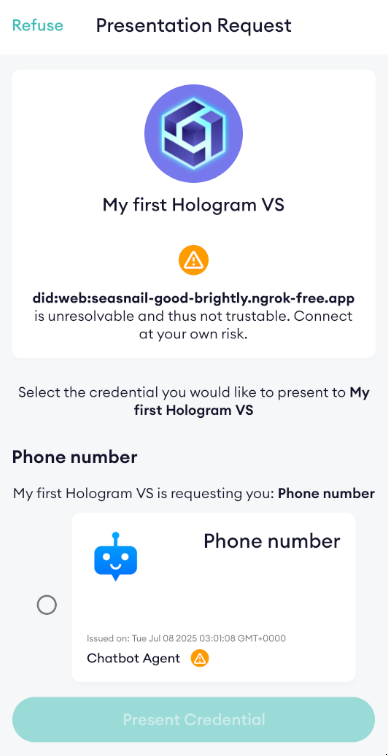
And in our backend (message-logger.ts) log, we'll see a line indicating that the user has scanned the code:
presentation flow ref: 1234-5678 status: scanned. Claims: undefined
Once we select a credential to present (the only one we have), we'll get into another screen
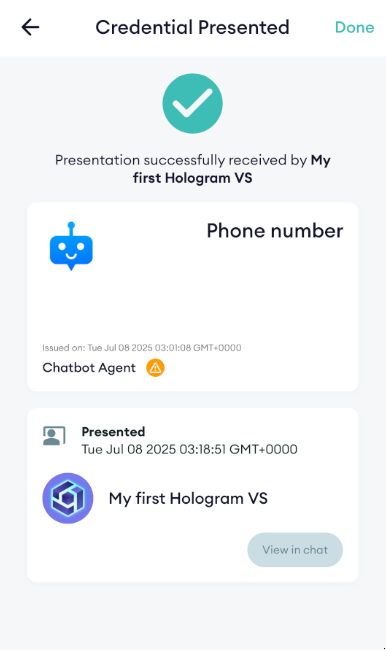
And in the backend log we'll see now two lines: one to indicate that the user accepted the invitation, and another one showing that we received the presentation, revealing the claims we requested.
presentation flow ref: 1234-5678 status: connected. Claims: undefined
presentation flow ref: 1234-5678 status: ok. Claims: [{"name":"phoneNumber","value":"+5712345678"}]
Using Hologram Generic Verifier
If you want to see a more advanced Credential Verifier built on top of VS Agent and related libraries, check out Hologram Generic Verifier. This is a NodeJS backend capable of using VS Agent API to create requests and render the credential contents in a web frontend.
In the repo you will find a full guide to easily customize for your needs. You can see it working in our online Gov ID demo.